How a Horse SVG Bundle Streamlines Creative Projects and Design Workflows
Scalable vector graphics (SVGs) have become an essential asset for designers, content creators, and small business owners who need scalable, editable, and lightweight visuals. When you assemble a collection of these files into a themed bundle—such as a Horse SVG Bundle—you gain more than just a set of images. You acquire a practical resource that can be woven into the planning, creation, and delivery stages of nearly any visual project. This article walks through how to integrate such a bundle into your real-world processes, from initial idea to final output, without hype or fluff.
What a Horse SVG Bundle Actually Contains
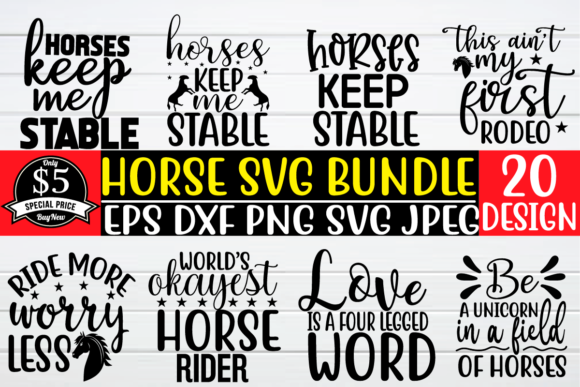
A typical Horse SVG Bundle includes multiple vector files featuring horses in various poses, styles, and levels of detail. You might find silhouette outlines, detailed riding scenes, western motifs, or minimalist icons. The files are usually delivered in SVG format, with additional options like EPS, DXF, or PNG for compatibility across different software and machines. The bundle’s value lies not in a single “perfect” horse graphic, but in the variety that lets you match the right visual to the right context—whether that’s a website header, a promotional flyer, a T‑shirt design, or a classroom handout.
Key attributes you should verify before downloading
- Layer structure: Well-organized SVGs allow you to hide, recolor, or move individual parts without breaking the design.
- Scale fidelity: Because SVGs are resolution-independent, you should verify that the files retain sharp edges when scaled up or down.
- Licensing terms: Most bundles come with a commercial license, but double-check restrictions on resale, merchandise, or digital products.
- File naming: Consistent naming (e.g., “horse_racing.svg”, “horse_silhouette_standing.svg”) makes searching and sorting far easier later.
Before the Project: Planning and Asset Preparation
Integrating a Horse SVG Bundle into your workflow starts long before you open your design software. During the planning phase, you can treat the bundle as a visual library that influences your creative direction. Instead of sketching every horse from scratch, you can browse the collection to decide on the posture, style, and complexity that best fits your message. This step saves time and reduces the risk of mismatched visuals.
Setting up a categorized folder structure
Create a master folder for your SVG bundles, then subfolders by theme (e.g., “Horse”, “Birds”, “Nature”). Inside the Horse folder, further divide by style: “Silhouettes”, “Detailed Line Art”, “Western Themes”, “Equestrian Sports”. This system lets you locate a specific horse SVG in seconds, even if the bundle grows over time. Consider adding a spreadsheet with columns for file name, description, keyword tags, and intended use (e.g., “web banner”, “merchandise”, “print”). This extra step pays off when you revisit the bundle months later.
Checking compatibility with your tools
Before you commit to a bundle, verify that the SVG code is clean and exports well into your primary software—whether that’s Adobe Illustrator, Affinity Designer, Inkscape, Cricut Design Space, or Silhouette Studio. Some bundles include proprietary layers that may cause glitches in free tools. Open one sample file, test a resize, and try a color change. If the file behaves well, the rest of the bundle likely will too.
During the Project: Efficient Design and Customization
Once the project kicks off, the Horse SVG Bundle becomes a flexible resource that can be used repeatedly without starting from scratch. The key is to treat each SVG not as a finished asset, but as a raw material you can modify.
Customizing colors and layers
Because SVGs store elements as paths and shapes, you can quickly change the fill color of a horse’s mane, adjust the opacity of a background element, or remove a fence line. In marketing materials, you might recolor the horse to match brand guidelines. In educational handouts, you might remove distracting details to focus on anatomy. The adaptability of SVGs makes these edits a matter of seconds, not hours.
Combining and recontextualizing assets
A bundle typically contains multiple stand-alone elements—a horse head, a full-body galloping horse, a rider, a saddle, a barn silhouette. You can combine these into composite graphics. For example, take a horse silhouette from one file, extract a rider from another, and layer them onto a sunset gradient. This compositing ability is especially valuable for social media posts, where unique visuals are essential but time for custom drawing is limited.
Scaling across media
Because the files are vectors, you can use the exact same horse SVG for a tiny business card icon and a massive trade show banner. Maintain a single source file and export to PNG or JPEG at the appropriate resolution when needed. This consistency ensures your branding or artistic vision remains uniform across all channels.
After the Project: Archiving, Reuse, and Quality Control
Many creators treat SVGs as disposable, but a proper archive turns a one‑time purchase into a long‑term resource. After you finish a project, take a few minutes to tag the files you used with notes about the project context. For example, “horse_silhouette.svg – used in Q3 webinar landing page – reduced opacity overlay.” This metadata helps you avoid recreating the same design months later.
Versioning and backup
Store your customized SVGs separately from the originals. Name them with a version or date (e.g., “horse_banner_v2.svg”). Keep a cloud backup of the entire bundle plus your modifications. This habit protects against accidental deletion and makes it easy to hand off the assets to a colleague or freelance designer.
Quality assurance checks
Before including a horse SVG in a final deliverable, visually inspect it at extreme sizes. Check for stray anchor points, invisible layers that might cause printing errors, or colors that look different on screen vs. paper. Some bundles include low-quality vectors that look fine at 100px but become jagged at 2000px. Testing at both ends of the scaling spectrum prevents embarrassing print artifacts.
Practical Workflow Examples
To illustrate how a Horse SVG Bundle fits into real work, here are three scenarios covering different roles.
For a freelance web designer
You are building a landing page for a local equestrian club. Instead of commissioning custom illustrations (which would cost time and money), you open your Horse SVG Bundle and select a clean silhouette for the hero section. You adjust the color to match the club’s brand, add a subtle drop shadow via CSS, and export a high‑resolution PNG for the logo. The page loads faster because SVG files are smaller than raster images, and you can reuse the same graphic in the footer and mobile menu with simple scaling.
For a small business owner (apparel)
You run a print‑on‑demand shop selling horse‑themed T‑shirts. Your workflow: choose a detailed horse SVG from the bundle, import it into your cutting machine software (Cricut or Silhouette), resize it to fit the shirt, and cut heat‑transfer vinyl. Because the bundle includes multiple designs, you can run a series of shirts without repeating the same image. Between orders, you modify colors or add text to create variations. The commercial license lets you sell these products without secondary royalty fees.
For an educator creating worksheets
A middle school science teacher needs a diagram of horse anatomy for a biology unit. The bundle provides a simplified line‑art horse. The teacher imports it into a presentation tool, removes labels from the original if any, and adds custom callouts for bone names. Because the SVG is vector, it prints clearly at any size—from a single handout to a poster for the classroom wall. The teacher can also reuse the same file next year, saving preparation time.
Common Integration Pitfalls and How to Avoid Them
Even a well‑curated Horse SVG Bundle can cause friction if not handled properly. Below are frequent issues and straightforward solutions.
- Missing fonts or effects. Some SVGs include text or filters that rely on system fonts. Solution: Convert text to paths inside your vector editor before sharing the file.
- Unexpected file sizes. A bundle with many complex paths can produce large SVGs, slowing down website loading. Solution: Use a tool like SVGO to optimize and minify the code without losing quality.
- Misplaced layers. Opening an SVG in a different program sometimes shifts elements. Solution: After import, ungroup everything and reassign layer order manually. Save a flattened copy for web use.
- License confusion. Different bundles have different rules about physical merchandise versus digital downloads. Solution: Keep a plain‑text file with the license summary inside the bundle folder so you never have to search for the original purchase email.
Organizing for Long‑Term Use
For professionals who build a library of SVG bundles over months or years, organization is the difference between a useful tool and a forgotten folder. Here are implementation tips that go beyond basic sorting.
- Use a digital asset manager (DAM): Tools like Eagle, Pixave, or even Adobe Bridge let you tag, rate, and preview SVGs without opening them. You can add custom fields like “project type” or “color palette”.
- Create a “palette” presets file: If you frequently recolour horse SVGs to match specific brand palettes, save a separate file with the colour swatches pre‑loaded. This cuts down repetitive recolor work.
- Batch rename for consistency: Use a renaming utility to replace ambiguous names (e.g., “img_4567.svg”) with descriptive ones like “horse_standing_side_profile.svg”. This makes search immediate.
- Store with a preview image: For each SVG, generate a 500px PNG thumbnail and place it in a sibling folder. Browsing thumbnails is much faster than opening each vector file.
Evaluating Bundles Before Purchase
Not all Horse SVG Bundles are created equal. To ensure smooth integration into your workflow, evaluate the following:
- Number of files: A bundle with 50 unique, well‑made SVGs is more valuable than one with 200 duplicate variations.
- Format flexibility: Check for SVG plus EPS, AI, or PDF. EPS is useful for legacy print workflows, while SVG is best for web.
- Preview images: Bundles that show each SVG as a clear thumbnail make selection faster.
- Customer support and updates: Some sellers offer free updates if they add more horses later. This extends the bundle’s life.
Final Integration Advice
A Horse SVG Bundle is not a magical solution that instantly creates great design. It is a raw material that rewards thoughtful preparation, organized storage, and deliberate customization. Whether you are a solo blogger, a small‑team marketing department, or a hobbyist exploring vector art, the key is to treat the bundle as a component in your broader creative process—not as a standalone asset. When you build your workflow around the bundle’s strengths (scalability, editability, variety) and mitigate its weaknesses (disorganization, license ambiguity, software compatibility), you will find that it becomes a reliable part of your toolkit, project after project.